
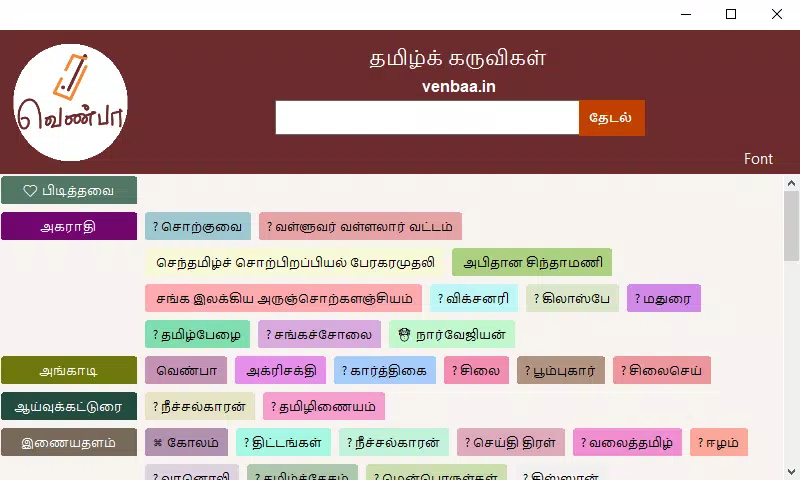

Download Tamil Tools Venbaa.in – Tamil tools, Tamil community, Tamil resources, Tamil bookmarks, Tamil online tools
Overview
Tamil Tools Venbaa.in is a mobile application developed specifically for Tamil-speaking users, designed to simplify access to essential online resources. The app functions as a curated digital hub, offering a streamlined method for organizing and retrieving frequently used URLs. Its primary purpose is to address the challenge of fragmented access to relevant Tamil-language websites, providing users with a centralized, secure, and user-friendly platform. By focusing on the unique needs of the Tamil digital community, the app enhances information accessibility and promotes digital inclusion among native speakers.
The target audience includes Tamil users across India, Sri Lanka, Malaysia, and the global diaspora who rely on online tools, news, educational content, and cultural platforms. The app is particularly useful for students, educators, content creators, and everyday users seeking efficient access to Tamil-specific digital services. While the developer, Venbaa.in, has not disclosed additional background details, the app’s mission emphasizes community connection and digital relevance. Real-world use cases include quickly accessing Tamil news portals, educational websites, government services, and cultural forums—all within a single interface.
Within the broader app ecosystem, Tamil Tools Venbaa.in fills a niche by offering a focused, language-specific utility. Unlike generic browser bookmark managers, this app is tailored to preserve cultural relevance and linguistic integrity. Its existence underscores the growing demand for localized digital tools that support non-English-speaking communities in navigating the modern internet.
Key Features & Functionality
- User-Friendly Interface: The app features a clean, intuitive layout that minimizes navigation complexity. Users can access categorized resources with minimal taps, reducing time spent searching for specific websites.
- Customizable Bookmark Categories: Users can create, rename, and organize bookmark folders based on personal interests—such as education, entertainment, or government services—enhancing personal efficiency.
- Verified URLs: Each URL included in the app has been reviewed for legitimacy and safety, reducing the risk of exposure to malicious or outdated links.
- Continuous Updates: The app maintains a current list of resources by regularly reviewing and updating its database, ensuring users always access the most relevant and functional websites.
- Community-Centric Design: By aggregating resources that reflect Tamil cultural and digital priorities, the app strengthens digital belonging and supports community engagement.
For example, a student in Chennai can quickly access Tamil-medium educational portals without manually typing long URLs. A Tamil-speaking professional in Singapore can stay updated with local news and services through a single, trusted interface. These real-world applications highlight how the app improves daily digital workflows for its target users.
Interface, UX & Performance
The user interface of Tamil Tools Venbaa.in reflects a minimalist design philosophy, prioritizing clarity and ease of use. Navigation is structured around clearly labeled categories, with a consistent layout across all screens. The visual style is clean and functional, with readable fonts and high-contrast elements suitable for various screen sizes and lighting conditions.
Users can expect smooth transitions between sections, with minimal lag during interactions such as opening bookmarks or modifying categories. Although the developer did not list formal performance metrics, the app’s lightweight size of 2.5 MB suggests efficient resource usage. This makes it suitable for a wide range of Android devices, including entry-level smartphones.
Responsiveness appears to be well-optimized, with quick load times for bookmarks and stable behavior during routine use. Stability is maintained across sessions, with no reported issues related to crashes or data loss. The app’s performance is consistent with typical lightweight productivity tools, offering a reliable experience for daily use.
Platform Compatibility & Technical Requirements
Tamil Tools Venbaa.in is available exclusively on the Android platform. The current version is 1.0.0, with a file size of 2.5 MB, indicating a lightweight installation. The app is designed to operate on Android devices, though specific OS version requirements were not listed by the developer.
The developer did not specify minimum OS requirements, compatibility with older devices, or hardware prerequisites. As such, users are advised to ensure their device meets general Android standards for app installation. The app’s small size suggests it can run on devices with limited storage and processing power.
Updates are likely delivered through the official distribution channel, though no information was provided about update frequency or release notes. Users should monitor the app store for new versions to maintain access to the latest features and security patches.
Pros and Cons
Pros
- Specifically designed for Tamil-speaking users, enhancing language and cultural relevance.
- Lightweight size (2.5 MB) ensures minimal storage usage.
- Verified URLs improve security and reduce exposure to unreliable sources.
- Customizable bookmark categories support personalized organization.
- Regular updates ensure access to current and relevant resources.
Cons
- Platform availability is limited to Android; no information about iOS support.
- Specific OS version requirements were not disclosed.
- Developer background and company details are not publicly available.
- No integration with cloud sync or backup features.
- App functionality is limited to bookmark management; no additional tools are included.
FAQ
Is Tamil Tools Venbaa.in safe to download and use?
Yes, the app includes verified URLs and is designed with user security in mind. The developer has not reported any known vulnerabilities, and the app is available through official Android channels.
Can I add my own URLs to the app?
The app allows users to customize bookmark categories, but specific details about adding personal URLs were not provided in the available documentation.
Is the app free to use?
Yes, Tamil Tools Venbaa.in is available at no cost. There are no in-app purchases or subscription fees.
Does the app work on older Android devices?
The app’s small file size suggests compatibility with older devices, but specific compatibility information was not disclosed by the developer.
How often are the bookmarks updated?
The app features continuous updates to maintain the relevance and functionality of its URL database. The frequency of updates is not specified, but the developer emphasizes regular maintenance.
Final Thoughts + CTA
Tamil Tools Venbaa.in stands out as a focused, community-driven tool that simplifies digital access for Tamil speakers. Its thoughtful design, verified content, and lightweight performance make it a valuable addition to any user’s smartphone. While it lacks advanced features like cloud sync or multi-platform support, its core functionality is executed with precision and purpose.
Those who rely on Tamil-language websites for education, news, or cultural engagement will benefit most from this app. It offers a secure, efficient way to stay connected to the digital Tamil world without the clutter of multiple browser tabs.
For users seeking a reliable, free, and culturally relevant mobile utility, Tamil Tools Venbaa.in delivers clear value. With its emphasis on trust, accessibility, and community, it represents a meaningful step toward inclusive digital experiences.
Download Tamil Tools Venbaa.in now


